Python 语言
导航
返回编程语言分类
Python是一种高级、通用、解释型、面向对象的编程语言。
章节目录
python的基本输入
输入字符串
1 | a=input() |
输入数字
1 | a=int(input()) # 输入小数时使用float(input()) |
输入多个数字,中间用(特殊符号)隔开。
1 | a=map(int,input().split()) |
split()不传参数时按连续空白字符分隔,包括空格和制表符;可用split(“,”)指定分隔符,但不能使用空字符串split(“”)。map返回迭代器,需要列表时可写list(map(int,input().split()))。
python的基本输出
输出字符
1 | print("hello world") |
输出变量,默认间隔为空格
1 | a,b,c=map(int,input().split()) |

输出变量,更改间隔符号
1 | a,b,c=map(int,input().split()) |
sep=”” 引号中间为空则输出去掉空格,引号中间为(,)则间隔为逗号。


多次输出,末尾不换行,并确定间隔符
1 | a,b,c=map(int,input().split()) |

基本类型转换
1 | # 将x转换为整数 |
以上转换符用法(以int(x)为例)
1 | a=int(x) |
列表
列表是一个元素的有序集合,一个列表中元素的数据类型可以各不相同,所有元素都放在[ ]中,相邻元素用逗号隔开。
列表的创建
1 | a_list=['physics','chemistry',2017,2.5] |
列表读取
列表可以通过下标读取,下标从0开始。
1 | a_list=['physics','chemistry',2017,2.5] |
列表切片
切片格式: 列表名[开始索引:结束索引:步长]
步长为正时,开始索引省略默认为0,结束索引省略默认为到末尾;步长省略默认为1,步长为负时默认从末尾向前切片。
1 | a_list=['physics','chemistry',2017,2.5] |
输出格式为
1 | ['chemistry',2017] |
增加元素
“+”
这种增加元素的方法是新开辟出一个空间存放新的列表,速度较慢。
这种方法不改变a_list的值。
1 | a_list=['physics','chemistry',2017,2.5] |
输出为
1 | ['physics','chemistry',2017,2.5,5] |
append( )
向原列表尾部添加一个新元素,不创建新的列表对象。
1 | a_list=['physics','chemistry',2017,2.5] |
输出
1 | ['physics', 'chemistry', 2017, 2.5, 'Python'] |
extend( )
将可迭代对象中的元素逐个添加到原列表的尾部,与“+”不同,extend( )会修改原列表。
1 | a_list=['physics','chemistry',2017,2.5] |
输出
1 | ['physics', 'chemistry', 2017, 2.5, 'Python'] |
insert( )
将一个元素插入到列表的指定位置。
insert( )格式:列表名.insert(插入位置,插入元素)
当插入位置大于列表的范围时新插入的元素在列表末尾
1 | a_list=['physics','chemistry',2017,2.5] |
输出
1 | [12.3, 'physics', 'chemistry', 2017, 2.5] |
查找元素
index( )
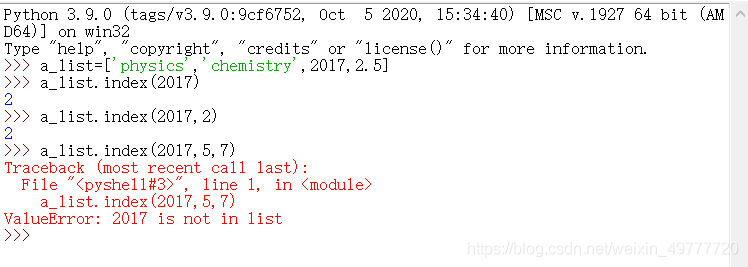
使用index可以获取指定元素首次出现的下标;指定范围内找不到时会抛出ValueError。
index( )格式:index(指定元素,start,end)
1 | a_list=['physics','chemistry',2017,2.5] |
输出
count( )
用count( )统计列表中指定元素出现次数。
格式:列表名.count(元素)
in
使用in判断元素是否在列表中。在列表中返回True,不在返回False。
删除元素
del
删除列表中指定位置元素,或整个列表。
格式:del 列表名[ ]
remove
删除列表中首次出现的指定元素。
格式:列表名.remove(元素)
pop
删除并返回指定位置的元素,缺少参数时删除最后一个元素。
列表常用函数
用关系运算符比较列表
列表1>列表2
从左向右比较,如果相同,比较下一个,当出现不同时返回一个值,结束比较。
第一个不相等的元素中,列表1的值较大时返回True,较小时返回False;若共同部分相等,则比较长度。若元素无法进行大小比较,则会抛出TypeError。
函数
len(列表):返回列表数据个数。
max,min:列表中的最大最小值。
sum:列表元素的和(必须是数字类型)
sorted:对列表升序排序。不改变原列表。
sorted(列表名,reverse=True):降序排序。
列表名.sort():对列表升序排序,改变原列表。
字符串
字符串相加
1 | what_he_does=' plays ' |

字符串相乘
1 | num=3 |

字符串替换
replace函数:string=string.replace(string[ : ],”word”)
format函数:”hello {} world”.format(“the”)
函数
函数创建
1 | def function(arg1,arg2): |
函数调用
1 | def function(arg1,arg2): |

Python库
python-docx
根据模板文件自动生成word文档,用python-docx工具来实现这个功能。
python-docx