导航 返回软件工程分类
SpringSecurity是Spring安全框架的一种,这里是哔哩哔哩视频 ,以下内容是对SpringSecurity补充。
这些主要是Spring Security 5.x、Spring Boot 2和javax.servlet时期的学习片段,邮箱部分还保留了更早版本的截图,不是可直接部署的完整认证系统。WebSecurityConfigurerAdapter从5.7弃用,6.x已移除;升级时还需迁移antMatchers、方法安全和Jakarta包,不能只删除父类。参见官方组件式配置说明 。
章节目录
Spring Security 无适配器配置 Spring Security JWT 配置 邮箱验证码原理 邮箱验证码发送接口 邮箱验证码控制器与前端 邮箱验证码第一次重构 邮箱登录 AuthenticationToken 邮箱登录 AuthenticationFilter 邮箱登录 AuthenticationProvider 邮箱验证码过滤器 邮箱登录安全配置 邮箱验证码第二次重构
简介 在本文中,我将提供一个解决方案来配置Spring安全性,而无需WebSecurityConfigurerAdapter类。从SpringSecurity5.7开始,WebSecurityConfigurerAdapter类已被弃用,Spring团队鼓励用户转向基于组件的安全配置。
在WebSecurityConfigurerAdapter类被弃用之前,我们正在编写这样的代码。我们创建了一个Spring Java配置类,它扩展了WebSecurityConfigurerAdapter类并覆盖了几个configure()方法:
1
2
3
4
5
6
7
8
9
10
11
12
13
@Configuration @EnableWebSecurity public class SecurityConfiguration extends WebSecurityConfigurerAdapter { @Override protected void configure (HttpSecurity http) throws Exception { } @Override public void configure (WebSecurity web) throws Exception { } }
从Spring Security 5.7.0-M2开始,WebSecurityConfigurerAdapter类已被弃用,Spring团队鼓励用户转向基于组件的安全配置。
没有网络安全配置器适配器 在使用基于组件的 Spring 安全配置的新方法中,您需要遵循以下非常简单的步骤:
删除WebSecurityConfigurerAdapter类(不要扩展WebSecurityConfigurerAdapter)
删除网络安全配置器适配器类的所有重写方法
使用SecurityFilterChain配置HttpSecurity,使用WebSecurityCustomizer配置WebSecurity:
1
2
3
4
5
6
7
8
9
10
11
12
13
14
15
@Configuration @EnableWebSecurity public class SecurityConfiguration { @Bean public SecurityFilterChain filterChain (HttpSecurity http) throws Exception { return http.build(); } @Bean public WebSecurityCustomizer webSecurityCustomizer () { return web -> { }; } }
让我们看一个完整的示例供您参考。
没有网络安全的Spring安全性配置器适配器示例 考虑我们在下面使用WebSecurityConfigurerAdapter类进行Spring安全配置,稍后我们将看到如何将此安全配置迁移到基于组件的方法。
1
2
3
4
5
6
7
8
9
10
11
12
13
14
15
16
17
18
19
20
21
22
23
24
25
26
27
28
29
30
31
32
33
34
35
36
37
38
39
40
41
42
43
44
45
46
47
48
49
50
51
52
53
54
55
56
57
58
59
60
61
62
package net.javaguides.springboot.config;import org.springframework.beans.factory.annotation.Autowired;import org.springframework.context.annotation.Bean;import org.springframework.context.annotation.Configuration;import org.springframework.security.authentication.dao.DaoAuthenticationProvider;import org.springframework.security.config.annotation.authentication.builders.AuthenticationManagerBuilder;import org.springframework.security.config.annotation.web.builders.HttpSecurity;import org.springframework.security.config.annotation.web.configuration.EnableWebSecurity;import org.springframework.security.config.annotation.web.configuration.WebSecurityConfigurerAdapter;import org.springframework.security.crypto.bcrypt.BCryptPasswordEncoder;import org.springframework.security.web.util.matcher.AntPathRequestMatcher;import net.javaguides.springboot.service.UserService;@Configuration @EnableWebSecurity public class SecurityConfiguration extends WebSecurityConfigurerAdapter { @Autowired private UserService userService; @Bean public BCryptPasswordEncoder passwordEncoder () { return new BCryptPasswordEncoder (); } @Bean public DaoAuthenticationProvider authenticationProvider () { DaoAuthenticationProvider auth = new DaoAuthenticationProvider (); auth.setUserDetailsService(userService); auth.setPasswordEncoder(passwordEncoder()); return auth; } @Override protected void configure (AuthenticationManagerBuilder auth) throws Exception { auth.authenticationProvider(authenticationProvider()); } @Override protected void configure (HttpSecurity http) throws Exception { http.authorizeRequests().antMatchers( "/registration**" , "/js/**" , "/css/**" , "/img/**" ).permitAll() .anyRequest().authenticated() .and() .formLogin() .loginPage("/login" ) .permitAll() .and() .logout() .invalidateHttpSession(true ) .clearAuthentication(true ) .logoutRequestMatcher(new AntPathRequestMatcher ("/logout" , "POST" )) .logoutSuccessUrl("/login?logout" ) .permitAll(); } }
接下来,这是没有WebSecurityConfigurerAdapter的基于组件的替代方法:
1
2
3
4
5
6
7
8
9
10
11
12
13
14
15
16
17
18
19
20
21
22
23
24
25
26
27
28
29
30
31
32
33
34
35
36
37
38
39
40
41
42
43
44
45
46
47
48
49
50
51
52
53
54
55
56
package net.javaguides.springboot.config;import org.springframework.beans.factory.annotation.Autowired;import org.springframework.context.annotation.Bean;import org.springframework.context.annotation.Configuration;import org.springframework.security.config.annotation.authentication.builders.AuthenticationManagerBuilder;import org.springframework.security.config.annotation.web.builders.HttpSecurity;import org.springframework.security.config.annotation.web.configuration.EnableWebSecurity;import org.springframework.security.core.userdetails.UserDetailsService;import org.springframework.security.crypto.bcrypt.BCryptPasswordEncoder;import org.springframework.security.crypto.password.PasswordEncoder;import org.springframework.security.web.SecurityFilterChain;import org.springframework.security.web.util.matcher.AntPathRequestMatcher;@Configuration @EnableWebSecurity public class SpringSecurity { @Bean public static PasswordEncoder passwordEncoder () { return new BCryptPasswordEncoder (); } @Bean public SecurityFilterChain filterChain (HttpSecurity http) throws Exception { http.authorizeRequests() .antMatchers("/register/**" ).permitAll() .antMatchers("/index" ).permitAll() .antMatchers("/users" ).hasRole("ADMIN" ) .anyRequest().authenticated() .and() .formLogin( form -> form .loginPage("/login" ) .loginProcessingUrl("/login" ) .defaultSuccessUrl("/users" ) .permitAll() ).logout( logout -> logout .logoutRequestMatcher(new AntPathRequestMatcher ("/logout" , "POST" )) .permitAll() ); return http.build(); } }
上面的例子仍使用5.x的authorizeRequests,表单登录和退出部分用了lambda配置;它并没有使用authorizeHttpRequests。表单登录保留默认CSRF保护,登录、注册和POST退出请求都要携带CSRF令牌,见官方CSRF文档 。
info UserDetailsService文档 。
下面的csrf().disable()仅适用于经过评估、不依赖浏览器自动携带凭证的令牌API;如果JWT放在Cookie中,或仍使用Session/Basic认证,STATELESS也不能代替CSRF防护。示例把GET /api/v1/**设为公开,只能用于确实可匿名读取的数据。JWT过滤器还必须验证签名、允许的算法、有效期以及所需的issuer/audience,这些实现未在本文给出。
考虑我们有以下的Spring安全性和使用WebSecurityConfigurerAdapter类的JWT配置,稍后我们将看到如何将此安全配置迁移到基于组件的方法。
1
2
3
4
5
6
7
8
9
10
11
12
13
14
15
16
17
18
19
20
21
22
23
24
25
26
27
28
29
30
31
32
33
34
35
36
37
38
39
40
41
42
43
44
45
46
47
48
49
50
51
52
53
54
55
56
57
58
59
60
61
62
63
64
65
66
67
68
69
70
71
72
73
74
75
76
77
78
79
80
81
82
83
84
85
86
87
88
89
90
package com.springboot.blog.config;import com.springboot.blog.security.CustomUserDetailsService;import com.springboot.blog.security.JwtAuthenticationEntryPoint;import com.springboot.blog.security.JwtAuthenticationFilter;import org.springframework.beans.factory.annotation.Autowired;import org.springframework.context.annotation.Bean;import org.springframework.context.annotation.Configuration;import org.springframework.http.HttpMethod;import org.springframework.security.authentication.AuthenticationManager;import org.springframework.security.config.annotation.authentication.builders.AuthenticationManagerBuilder;import org.springframework.security.config.annotation.method.configuration.EnableGlobalMethodSecurity;import org.springframework.security.config.annotation.web.builders.HttpSecurity;import org.springframework.security.config.annotation.web.configuration.EnableWebSecurity;import org.springframework.security.config.annotation.web.configuration.WebSecurityConfigurerAdapter;import org.springframework.security.config.http.SessionCreationPolicy;import org.springframework.security.core.userdetails.User;import org.springframework.security.core.userdetails.UserDetails;import org.springframework.security.core.userdetails.UserDetailsService;import org.springframework.security.crypto.bcrypt.BCryptPasswordEncoder;import org.springframework.security.crypto.password.PasswordEncoder;import org.springframework.security.provisioning.InMemoryUserDetailsManager;import org.springframework.security.web.authentication.UsernamePasswordAuthenticationFilter;@Configuration @EnableWebSecurity @EnableGlobalMethodSecurity(prePostEnabled = true) public class SecurityConfig extends WebSecurityConfigurerAdapter { @Autowired private CustomUserDetailsService userDetailsService; @Autowired private JwtAuthenticationEntryPoint authenticationEntryPoint; @Bean public JwtAuthenticationFilter jwtAuthenticationFilter () { return new JwtAuthenticationFilter (); } @Bean PasswordEncoder passwordEncoder () { return new BCryptPasswordEncoder (); } @Override protected void configure (HttpSecurity http) throws Exception { http .csrf().disable() .exceptionHandling() .authenticationEntryPoint(authenticationEntryPoint) .and() .sessionManagement() .sessionCreationPolicy(SessionCreationPolicy.STATELESS) .and() .authorizeRequests() .antMatchers(HttpMethod.GET, "/api/v1/**" ).permitAll() .antMatchers("/api/v1/auth/**" ).permitAll() .antMatchers("/v2/api-docs/**" ).permitAll() .antMatchers("/swagger-ui/**" ).permitAll() .antMatchers("/swagger-resources/**" ).permitAll() .antMatchers("/swagger-ui.html" ).permitAll() .antMatchers("/webjars/**" ).permitAll() .anyRequest() .authenticated(); http.addFilterBefore(jwtAuthenticationFilter(), UsernamePasswordAuthenticationFilter.class); } @Override protected void configure (AuthenticationManagerBuilder auth) throws Exception { auth.userDetailsService(userDetailsService) .passwordEncoder(passwordEncoder()); } @Override @Bean public AuthenticationManager authenticationManagerBean () throws Exception { return super .authenticationManagerBean(); } }
接下来,这是没有WebSecurityConfigurerAdapter的基于组件的替代方法:
1
2
3
4
5
6
7
8
9
10
11
12
13
14
15
16
17
18
19
20
21
22
23
24
25
26
27
28
29
30
31
32
33
34
35
36
37
38
39
40
41
42
43
44
45
46
47
48
49
50
51
52
53
54
55
56
57
58
59
60
61
62
63
64
65
66
67
68
69
70
71
72
73
74
75
76
77
78
79
80
81
82
83
84
85
86
87
88
89
90
91
92
93
94
95
96
97
98
99
100
101
102
103
104
105
106
107
108
109
110
111
112
113
114
115
116
117
118
package com.springboot.blog.config;import com.springboot.blog.security.CustomUserDetailsService;import com.springboot.blog.security.JwtAuthenticationEntryPoint;import com.springboot.blog.security.JwtAuthenticationFilter;import org.springframework.beans.factory.annotation.Autowired;import org.springframework.context.annotation.Bean;import org.springframework.context.annotation.Configuration;import org.springframework.http.HttpMethod;import org.springframework.security.authentication.AuthenticationManager;import org.springframework.security.config.annotation.authentication.builders.AuthenticationManagerBuilder;import org.springframework.security.config.annotation.authentication.configuration.AuthenticationConfiguration;import org.springframework.security.config.annotation.method.configuration.EnableGlobalMethodSecurity;import org.springframework.security.config.annotation.web.builders.HttpSecurity;import org.springframework.security.config.annotation.web.configuration.EnableWebSecurity;import org.springframework.security.config.annotation.web.configuration.WebSecurityConfigurerAdapter;import org.springframework.security.config.http.SessionCreationPolicy;import org.springframework.security.core.userdetails.User;import org.springframework.security.core.userdetails.UserDetails;import org.springframework.security.core.userdetails.UserDetailsService;import org.springframework.security.crypto.bcrypt.BCryptPasswordEncoder;import org.springframework.security.crypto.password.PasswordEncoder;import org.springframework.security.provisioning.InMemoryUserDetailsManager;import org.springframework.security.web.SecurityFilterChain;import org.springframework.security.web.authentication.UsernamePasswordAuthenticationFilter;@Configuration @EnableWebSecurity @EnableGlobalMethodSecurity(prePostEnabled = true) public class SecurityConfig { @Autowired private CustomUserDetailsService userDetailsService; @Autowired private JwtAuthenticationEntryPoint authenticationEntryPoint; @Bean public JwtAuthenticationFilter jwtAuthenticationFilter () { return new JwtAuthenticationFilter (); } @Bean PasswordEncoder passwordEncoder () { return new BCryptPasswordEncoder (); } @Bean protected SecurityFilterChain securityFilterChain (HttpSecurity http) throws Exception { http .csrf().disable() .exceptionHandling() .authenticationEntryPoint(authenticationEntryPoint) .and() .sessionManagement() .sessionCreationPolicy(SessionCreationPolicy.STATELESS) .and() .authorizeRequests((authorize) -> authorize .antMatchers(HttpMethod.GET, "/api/v1/**" ).permitAll() .antMatchers("/api/v1/auth/**" ).permitAll() .antMatchers("/v2/api-docs/**" ).permitAll() .antMatchers("/swagger-ui/**" ).permitAll() .antMatchers("/swagger-resources/**" ).permitAll() .antMatchers("/swagger-ui.html" ).permitAll() .antMatchers("/webjars/**" ).permitAll() .anyRequest() .authenticated() ); http.addFilterBefore(jwtAuthenticationFilter(), UsernamePasswordAuthenticationFilter.class); return http.build(); } @Bean public AuthenticationManager authenticationManager ( AuthenticationConfiguration authenticationConfiguration) throws Exception { return authenticationConfiguration.getAuthenticationManager(); } }
SpringSecurity邮箱验证码登录配置方式 简介
安全边界 OWASP验证码安全要求 。
实现邮箱认证码登录步骤:
电子邮件原理
开发邮箱验证码接口
校验邮箱验证码并登录
重构代码
发送接收电子邮件原理 电子邮件服务器 用户要在Internet上提供电子邮件功能,必须有专门的电子邮件服务器。
邮件服务器就好像是互联网世界的邮局。可以划分为两种类型:
SMTP邮件服务器:接收客户端提交的邮件,并向其他邮件服务器转发或接收发给本地用户的邮件。(邮递员)
POP3/IMAP邮件服务器:用户帮助用户读取SMTP邮件服务器接收进来的邮件。(门前邮递箱)
电子邮箱 而电子邮箱(163、qq、gmail)其实就是用户在电子邮件服务器上申请的账户
邮件客户端 而邮件客户端(FoxMail、Outlook等)集发送和收发功能于一体,帮助用户将邮件发送给SMTP邮件服务器和从POP3/IMAP邮件服务器读取用户的电子邮件。
邮件传输协议
简单邮件传输协议(Simple Mail Transfer Protocol,SMTP):定义了客户端和SMTP邮件发送服务器之间,以及两台SMTP邮件服务器之间的通信规则。
邮局协议(Post Office Protocol,POP3):定义了客户端和POP3邮件接收服务器的通信规则。
互联网消息访问协议(Internet Message Access Protocol,IMAP):与POP3并列的邮件访问协议,支持在服务器上管理文件夹、邮件状态等,并不是POP3的扩展。
邮件格式 下面的RFC822是早期邮件格式规范,后来由RFC2822、RFC5322 接替;MIME则扩展了邮件内容类型和编码。
RFC822文档
复杂邮件体的格式(Multipurpose Internet Mail Extensions,MIME)
可以表达多段平行的文本内容和非文本的邮件内容,例如,在邮件体中内嵌的图像数据和邮件附件等。
MIME协议的数据格式也可以避免邮件内容在传输过程中发生信息丢失。
MIME协议不是对RFC822邮件格式的升级和替代,而是基于RFC822邮件格式的扩展应用。
一言以蔽之,RFC822定义了邮件内容的格式和邮件头字段的详细细节,MIME协议则是定义了如何在邮件体部分表达出的丰富多样的数据内容。
电子邮件发送和接收流程
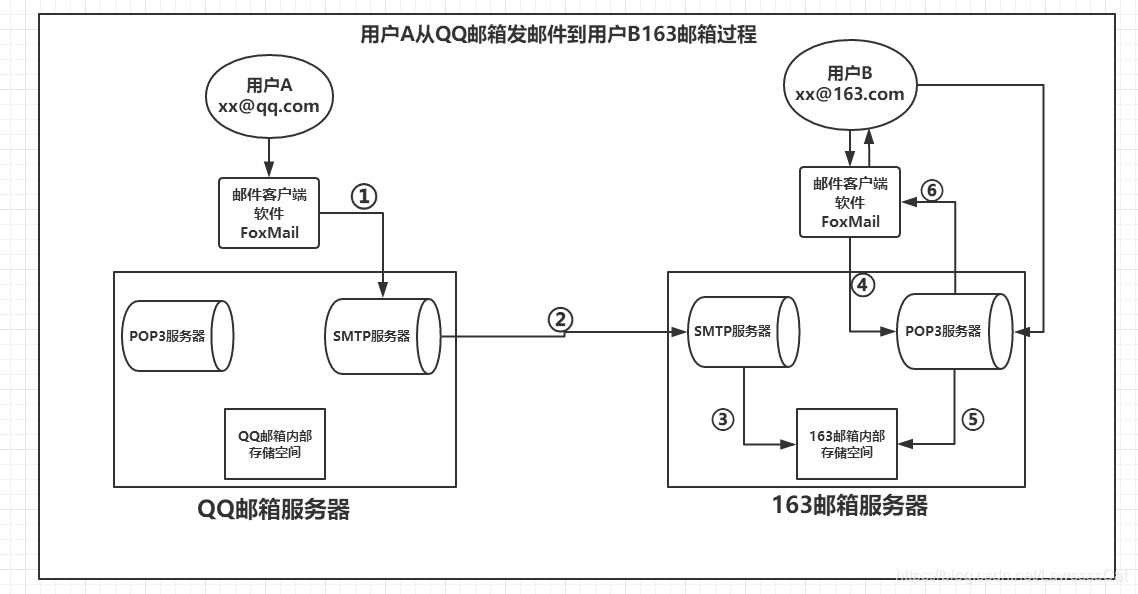
用户A的电子邮箱为:xx@qq.com ,通过邮件客户端软件写好一封邮件,交到QQ的邮件服务器,这一步使用的协议是SMTP,对应图示的①;
QQ邮箱服务器 会根据用户A发送的邮件进行解析,根据收件地址判断是否是自己管辖的账户
如果收件地址也是 QQ邮箱服务器 内,那么会直接存放到自己的存储空间。
如果发送给其他服务器(如163),那么QQ邮箱就会将邮件转发到163邮箱服务器,转发使用SMTP协议,对应图示的②;
163邮箱服务器接收到QQ邮箱服务器转发过来的邮件
会判断收件地址是否在自己内部,发现是自己的账户,那么就会将QQ邮箱转发过来的邮件存放到自己的内部存储空间,对应图示的③;
用户B会通过邮件客户端软件先向163邮箱服务器请求,要求收取自己的邮件,对应图示的④;使用的协议是POP3
163邮箱服务器收到用户B的请求后,会从自己的存储空间中取出B未收取的邮件,对应图示⑤;使用的协议是POP3
163邮箱服务器取出用户B未收取的邮件后,将邮件发给用户B,对应图示的⑥;使用的协议是POP3
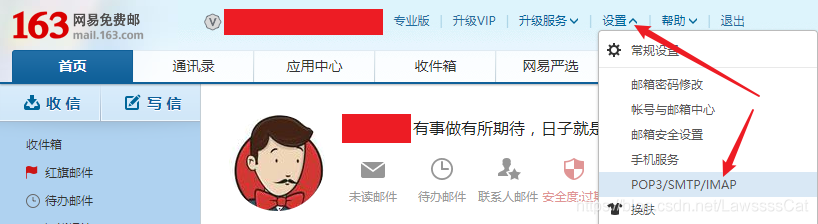
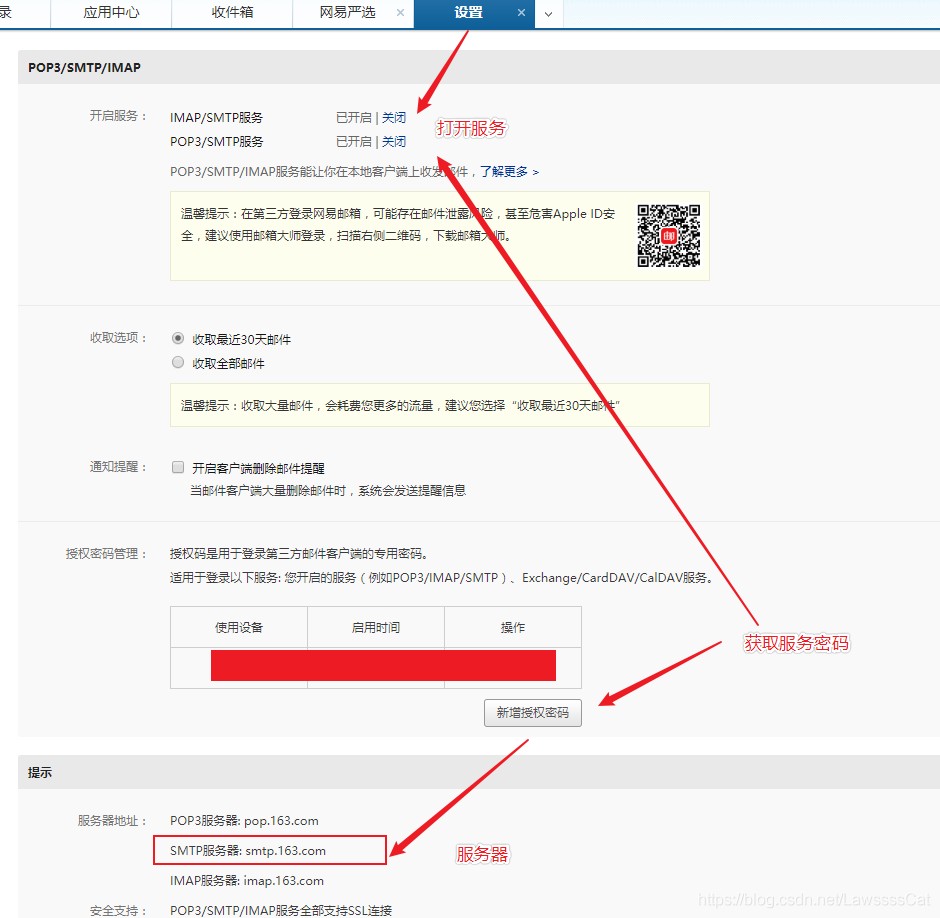
开发邮箱验证码接口 邮箱服务器打开smtp服务
引入依赖 1 2 3 4 5 <dependency > <groupId > org.springframework.boot</groupId > <artifactId > spring-boot-starter-mail</artifactId > </dependency >
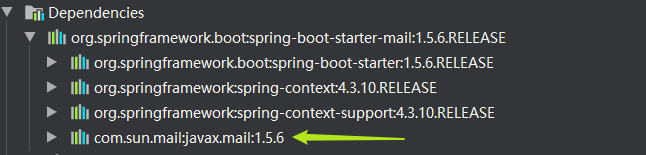
发送email的依赖,springboot帮我们封装好了
截图是旧版JavaMail依赖,不能据此判断当前版本的实现;依赖应由项目对应的Spring Boot版本管理。
1 2 3 4 5 6 7 8 9 10 11 12 13 14 15 16 17 spring: mail: host: ${MAIL_HOST} port: ${MAIL_PORT:465} protocol: smtp username: ${MAIL_USERNAME} password: ${MAIL_PASSWORD} properties: mail.smtp.auth: true mail.smtp.ssl.enable: true mail.smtp.ssl.checkserveridentity: true default-encoding: utf-8
这份配置要求服务商支持对应端口的隐式TLS;如果服务商要求STARTTLS,应按其文档同时调整端口与TLS配置,不能只改端口。不要通过关闭证书验证来排障,见RFC8314 。
编写EmailCodeSender实现 对springboot的sender进一步封装,通过接口能快速更换api
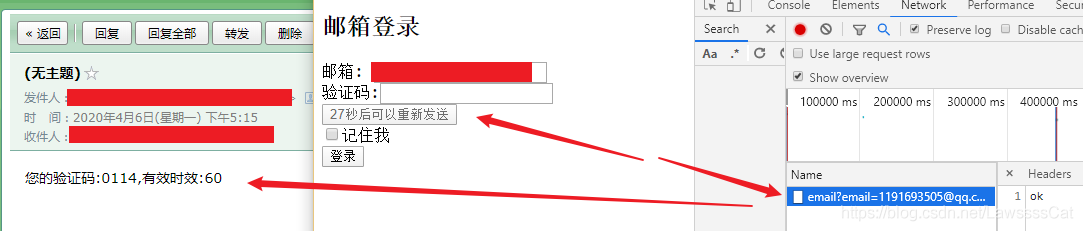
1 2 3 4 5 6 7 8 9 10 11 12 13 14 15 16 17 18 19 20 21 22 23 24 25 26 27 28 29 30 31 32 33 34 35 36 37 38 39 40 41 42 43 44 45 46 47 48 49 50 51 52 53 54 55 56 57 58 import cn.vshop.security.core.properties.SecurityProperties;import lombok.Setter;import lombok.extern.slf4j.Slf4j;import org.springframework.beans.factory.annotation.Autowired;import org.springframework.beans.factory.annotation.Value;import org.springframework.mail.SimpleMailMessage;import org.springframework.mail.javamail.JavaMailSender;@Slf4j @Setter public class DefaultEmailCodeSender implements EmailCodeSender { @Value("${spring.mail.username}") private String from; @Autowired private JavaMailSender mailSender; @Autowired private SecurityProperties securityProperties; @Override public void send (String to, String code) { SimpleMailMessage message = new SimpleMailMessage (); message.setText(contentBild(code, securityProperties.getCode().getEmail().getExpireIn())); message.setTo(to); message.setFrom(from); mailSender.send(message); } private String contentBild (String code, int expireIn) { StringBuilder sb = new StringBuilder (); sb.append("您的验证码:" ); sb.append(code); sb.append(",有效时效:" ); sb.append(expireIn); return sb.toString(); } }
编写EmailCodeSender接口 1 2 3 4 5 6 7 8 9 10 11 12 13 14 15 16 public interface EmailCodeSender { void send (String to, String code) ; }
编写校验码生成器EmailCodeGenerator 1 2 3 4 5 6 7 8 9 10 11 12 13 14 15 16 17 18 19 20 21 22 23 24 25 26 27 28 29 30 31 32 33 34 import cn.vshop.security.core.properties.SecurityProperties;import cn.vshop.security.core.validate.code.ValidateCode;import cn.vshop.security.core.validate.code.ValidateCodeGenerator;import org.springframework.beans.factory.annotation.Autowired;import javax.servlet.http.HttpServletRequest;import java.security.SecureRandom;public class EmailCodeGenerator implements ValidateCodeGenerator { @Autowired private SecurityProperties securityProperties; @Override public ValidateCode generate (HttpServletRequest request) { return new ValidateCode (getCode(), securityProperties.getCode().getEmail().getExpireIn()); } private final SecureRandom random = new SecureRandom (); private String getCode () { StringBuilder sb = new StringBuilder (); for (int i = 0 ; i < securityProperties.getCode().getEmail().getLength(); i++) { sb.append(random.nextInt(10 )); } return sb.toString(); } }
修改ValidateCodeController 在ValidateCodeController中添加接口,和相应的依赖
按情况修改前面代码的名称,使代码读起来更加合理
1 2 3 4 5 6 7 8 9 10 11 12 13 14 15 16 17 18 19 20 21 22 23 24 25 26 27 28 29 30 31 32 33 34 35 36 37 38 39 40 41 42 43 44 45 46 47 48 49 50 51 52 53 54 55 56 57 58 59 60 61 62 63 64 65 66 67 68 69 70 71 72 73 74 75 76 77 78 79 80 81 82 83 84 85 86 87 88 89 90 91 92 93 94 95 96 97 98 99 100 101 102 103 104 105 106 107 108 109 110 111 import cn.vshop.security.core.validate.code.email.EmailCodeSender;import cn.vshop.security.core.validate.code.image.ImageCode;import org.springframework.beans.factory.annotation.Autowired;import org.springframework.beans.factory.annotation.Qualifier;import org.springframework.social.connect.web.HttpSessionSessionStrategy;import org.springframework.social.connect.web.SessionStrategy;import org.springframework.web.bind.ServletRequestBindingException;import org.springframework.web.bind.ServletRequestUtils;import org.springframework.web.bind.annotation.GetMapping;import org.springframework.web.bind.annotation.PostMapping;import org.springframework.security.web.csrf.CsrfToken;import org.springframework.web.bind.annotation.RestController;import org.springframework.web.context.request.ServletWebRequest;import javax.imageio.ImageIO;import javax.servlet.http.HttpServletRequest;import javax.servlet.http.HttpServletResponse;import java.io.IOException;@RestController public class ValidateCodeController { public static final String IMAGE_SESSION_KEY = "SESSION_KEY_IMAGE_CODE" ; public static final String EMAIL_SESSION_KEY = "SESSION_KEY_EMAIL_CODE" ; @Autowired @Qualifier("imageCodeGenerator") private ValidateCodeGenerator imageCodeGenerator; @Autowired @Qualifier("emailCodeGenerator") private ValidateCodeGenerator emailCodeGenerator; @Autowired @Qualifier("emailCodeSender") private EmailCodeSender emailCodeSender ; private SessionStrategy sessionStrategy = new HttpSessionSessionStrategy (); @GetMapping("/code/image") public void createCode (HttpServletRequest request, HttpServletResponse response) throws IOException { ImageCode imageCode = (ImageCode) imageCodeGenerator.generate(request); sessionStrategy.setAttribute( new ServletWebRequest (request), IMAGE_SESSION_KEY, imageCode); ImageIO.write( imageCode.getImage(), "JPEG" , response.getOutputStream()); } @PostMapping("/code/email") public void createEmailCode (HttpServletRequest request, HttpServletResponse response) throws ServletRequestBindingException { String email = ServletRequestUtils.getRequiredStringParameter(request, "email" ).trim(); ValidateCode emailCode = emailCodeGenerator.generate(request); emailCodeSender.send(email, emailCode.getCode()); sessionStrategy.setAttribute(new ServletWebRequest (request), EMAIL_SESSION_KEY, new java .util.AbstractMap.SimpleImmutableEntry<>(email, emailCode)); } @GetMapping("/csrf") public CsrfToken csrf (CsrfToken token) { return token; } }
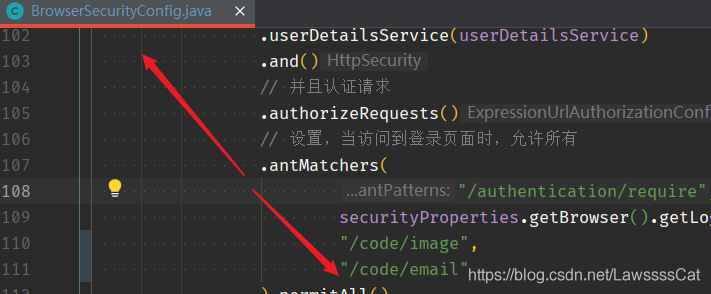
打开接口的访问权限 允许匿名访问登录页、GET /csrf和POST /code/email,但保留CSRF保护。permitAll不会跳过CSRF校验,也不要将整个安全过滤器链忽略。本文前端从同源/csrf获取令牌,登录和发送验证码时一并提交。
修改application.yml 把登录的界面改成新写的界面
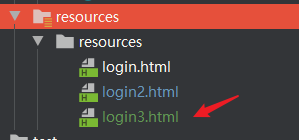
application.yml 1 2 3 4 5 v: security: browser: loginPage: /login3.html
前端代码 创建新的登录页面 login3.html
下面修正发送按钮误提交表单、读到旧邮箱值和错误响应仍提示成功的问题。静态登录页先获取CSRF令牌;生产环境还应补充网络重试和可访问性提示。
login3.html 1 2 3 4 5 6 7 8 9 10 11 12 13 14 15 16 17 18 19 20 21 22 23 24 25 26 27 28 29 30 31 32 33 34 35 36 37 38 39 40 41 42 43 44 45 46 47 48 49 50 51 52 53 54 55 56 57 58 59 60 61 62 63 64 65 66 67 68 69 70 71 72 73 74 75 76 77 78 79 80 81 82 83 84 85 86 87 88 <!DOCTYPE html > <html lang ="en" > <head > <meta charset ="UTF-8" > <title > Title</title > </head > <body > <h2 > 邮箱登录</h2 > <form id ="loginForm" method ="post" action ="/authentication/email" > 邮箱: <input type ="text" name ="email" value ="user@example.com" > <br > 验证码:<input type ="text" name ="emailCode" > <input type ="hidden" id ="csrfToken" > <button type ="button" id ="sendButton" onclick ="sendCode(this)" disabled > 发送验证码</button > <br > <input type ="checkbox" value ="true" name ="remember-me" > 记住我<br > <input type ="submit" id ="loginButton" value ="登录" disabled > </form > <script > let csrfReady = false ; document .getElementById ("loginForm" ).addEventListener ("submit" , event => if (!csrfReady) event.preventDefault (); }); fetch ('/csrf' , { credentials : 'same-origin' }) .then (response => if (!response.ok ) throw new Error ('无法获取CSRF令牌' ); return response.json (); }) .then (csrf => if (!csrf.parameterName || !csrf.token ) throw new Error ('CSRF令牌不可用' ); const input = document .getElementById ("csrfToken" ); input.name = csrf.parameterName ; input.value = csrf.token ; csrfReady = true ; document .getElementById ("sendButton" ).disabled = false ; document .getElementById ("loginButton" ).disabled = false ; }) .catch (() => alert ('无法初始化登录,请刷新重试' )); function sendCode (o ) { if (!csrfReady) return ; const form = new FormData (document .getElementById ("loginForm" )); const csrf = document .getElementById ("csrfToken" ); const body = new URLSearchParams (); body.set ('email' , form.get ('email' )); body.set (csrf.name , csrf.value ); let xhr = new XMLHttpRequest (); xhr.open ('POST' , '/code/email' ); xhr.setRequestHeader ('Content-Type' , 'application/x-www-form-urlencoded' ); o.disabled = true ; xhr.onload = function ( if (xhr.status >= 200 && xhr.status < 300 ) { alert ("验证码发送成功!" ); time (o); } else { o.disabled = false ; alert ("发送失败,请稍后重试" ); } }; xhr.onerror = function ( o.disabled = false ; alert ("网络异常,请稍后重试" ); }; xhr.send (body.toString ()); } let wait = 60 ; let content = "发送验证码" function time (o ) { if (wait == 0 ) { o.removeAttribute ("disabled" ); if (content) o.innerHTML = content; wait = 60 ; } else { o.setAttribute ("disabled" , true ); o.innerHTML = wait + "秒后可以重新发送" ; wait--; setTimeout (() => { time (o) }, 1000 ); } } </script > </body > </html >
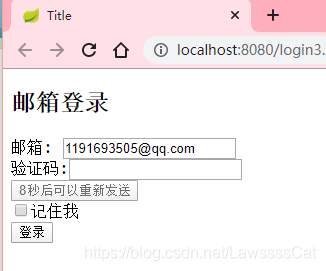
访问测试 http://localhost:8080/login3.html
写入邮箱
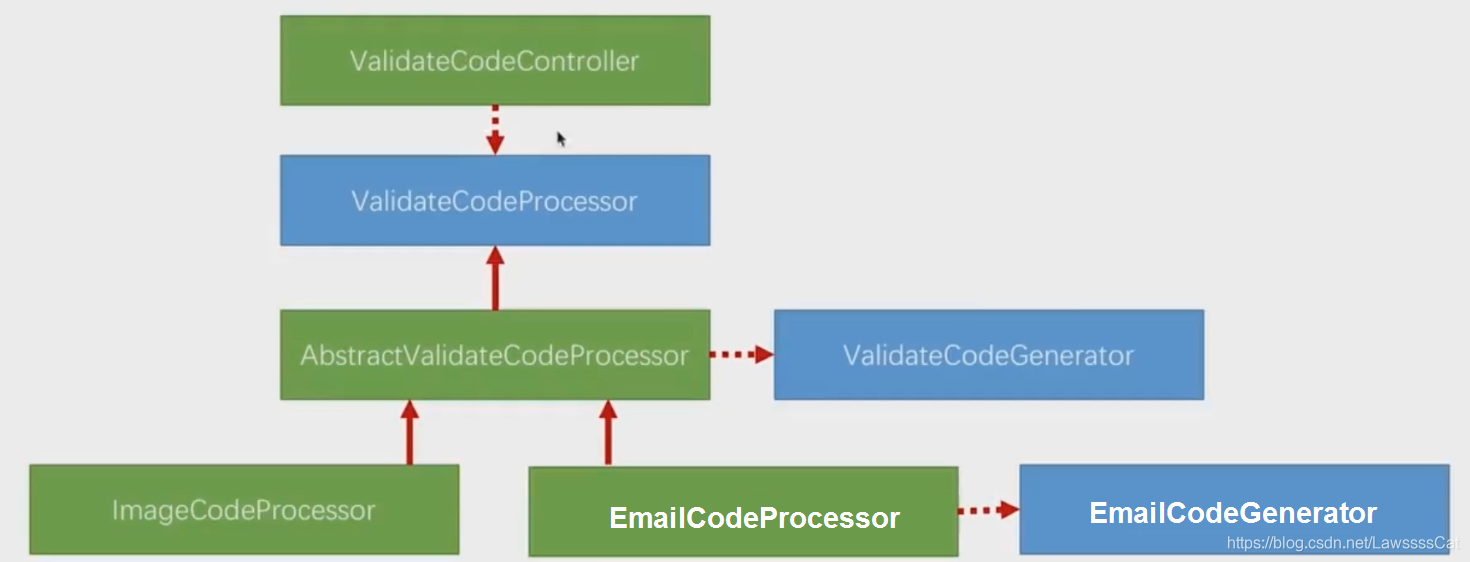
重构代码(一) 重构思路是用模板方法把代码(分级)抽出
声明ValidateCodeProcessor接口(处理验证码生成整个流程)
生成验证码过程抽象为三步:生成、存储、发送
如果整个验证码逻辑发生改变,只需要借助一级创建一个新接口实现即可。
接口有一个抽象的实现AbstractValidateCodeProcessor
实现两步:生成、存储
其中生成逻辑封装在:ValidateCodeGenerator,根据不同类型认证码给出不同实现
而不一样的部分:发送(邮箱发送、图片发送)则写到子类ImageCodeProcessor和EmailCodeProcessor
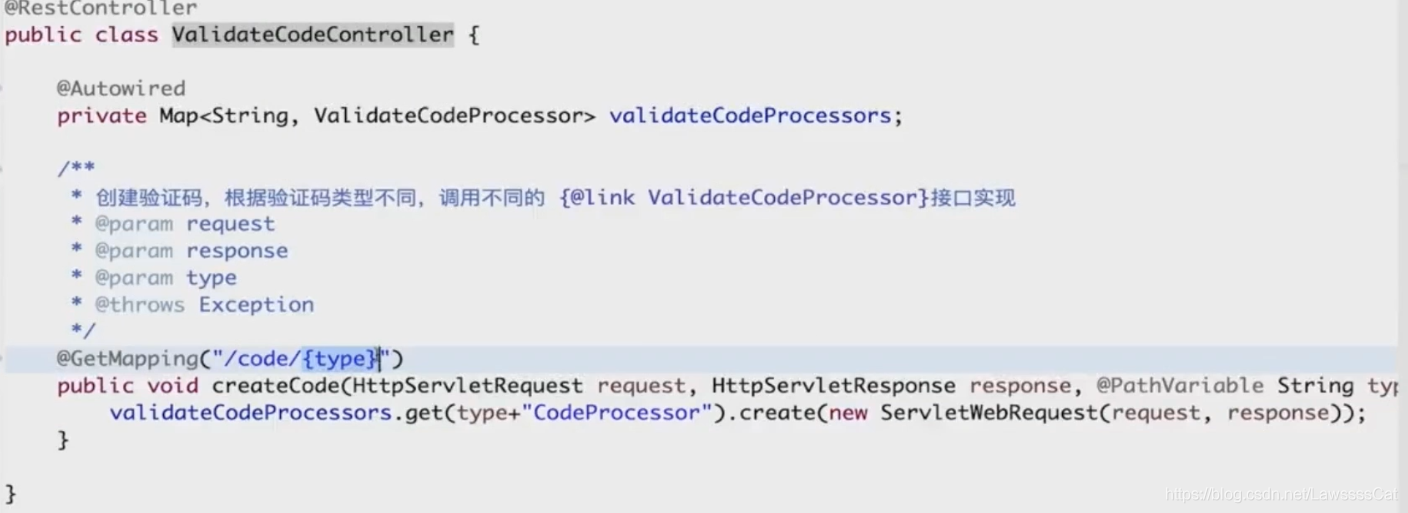
重构抽象类generate方法时,用到Spring常见的开发技巧:依赖查找 因为图形验证码和邮箱验证码的生成逻辑都是封装在ValidateCodeGenerator接口下面,当我们(下图)形式注入时
spring会把实现了接口的bean,以名字作为key,bean的值作为value存入
当收到请求,会从请求中截取认证类型的部分,调用相应的认证类型的ValidateCodeGenerator
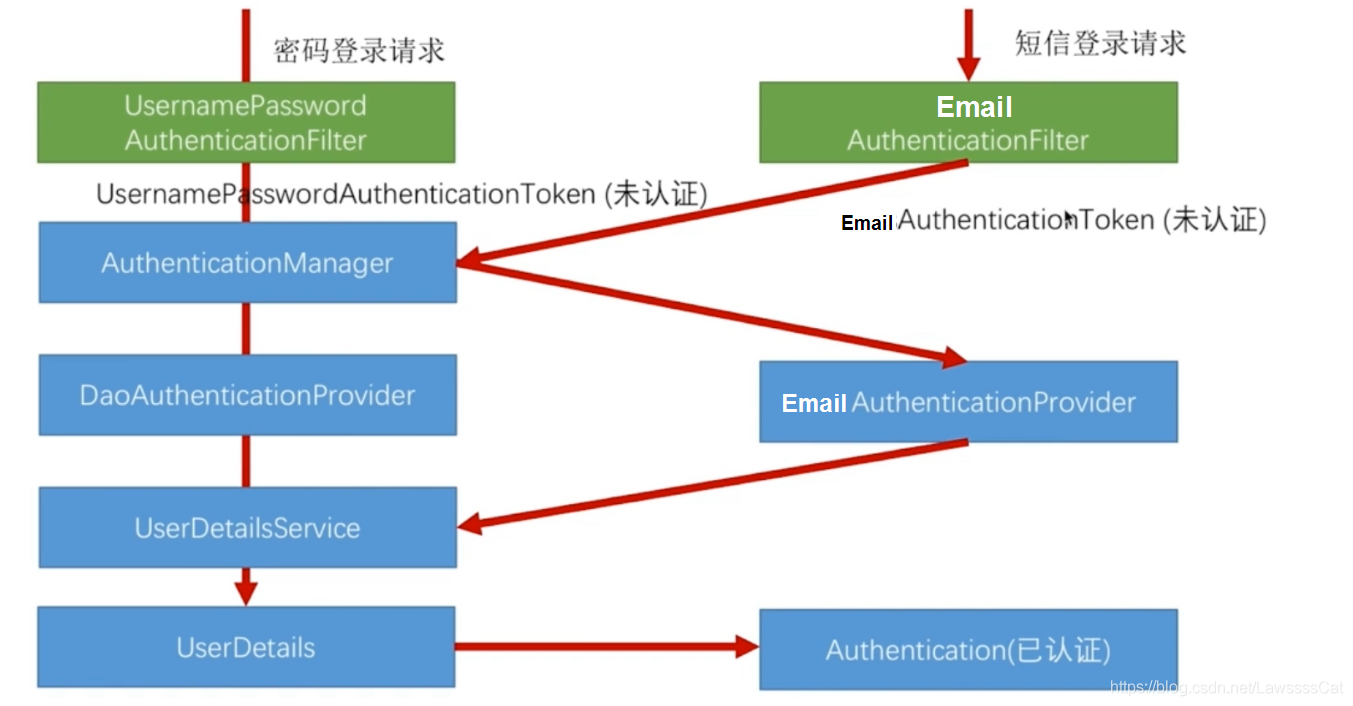
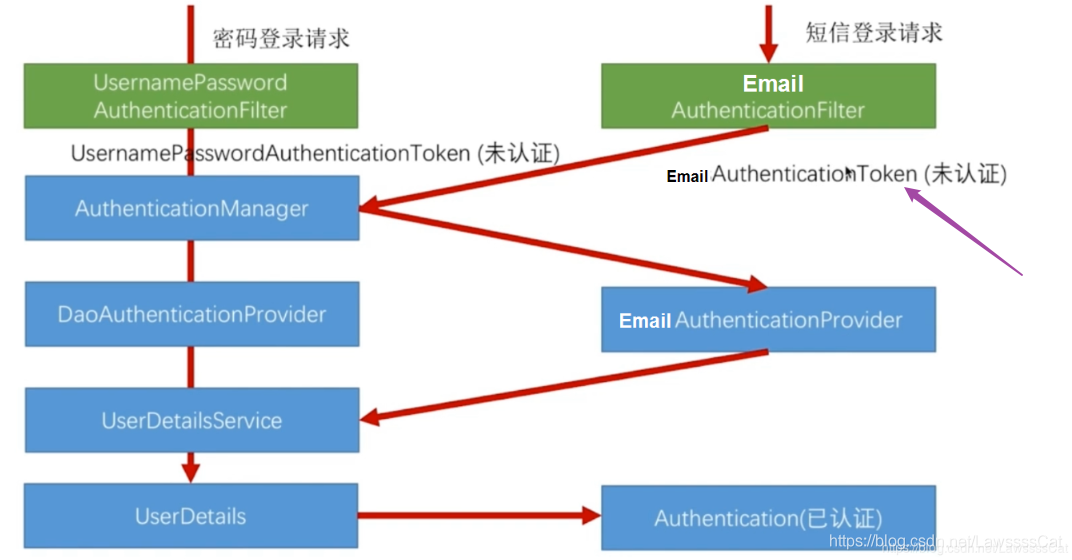
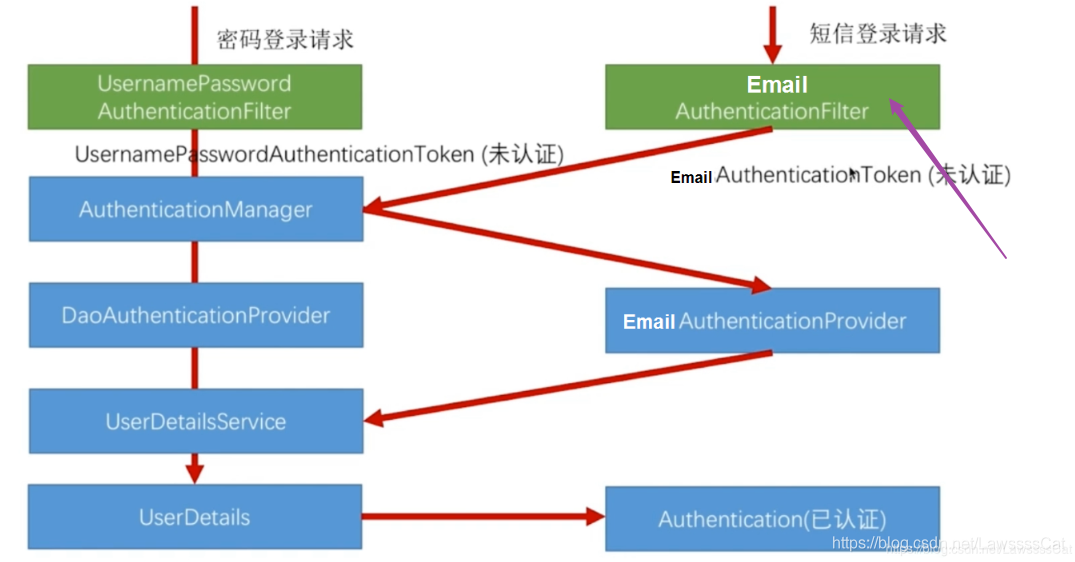
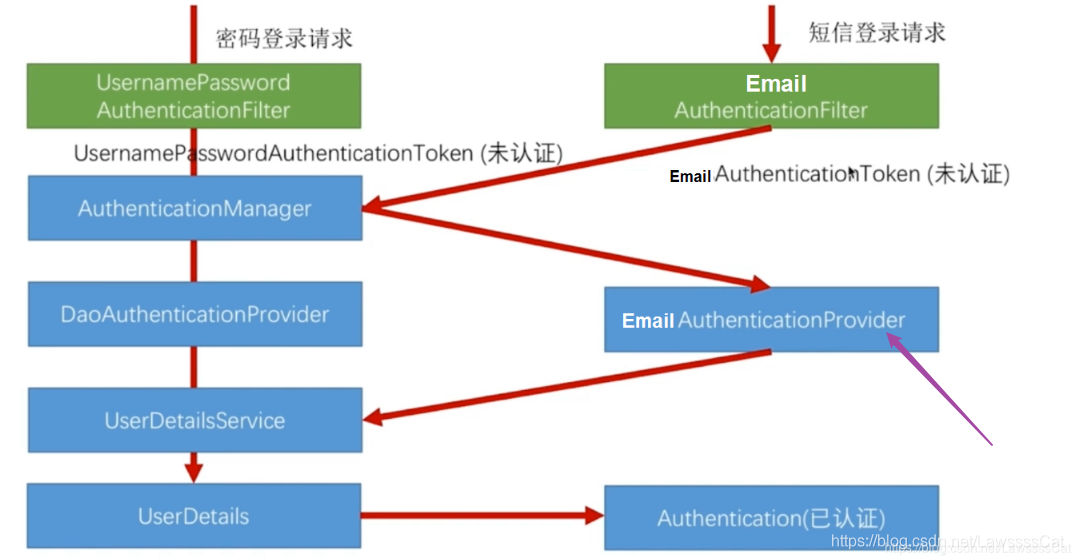
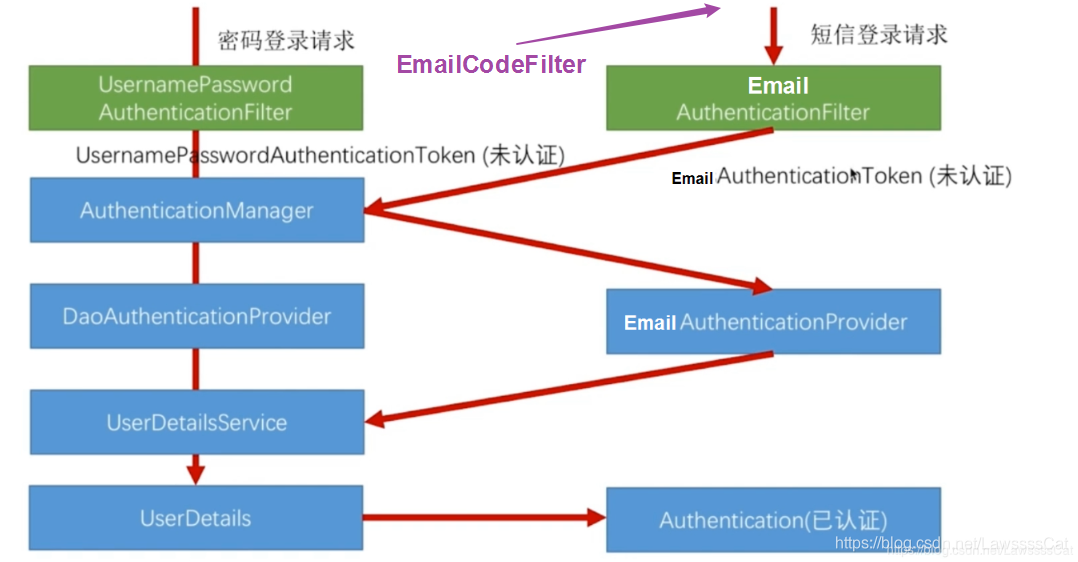
校验邮箱验证码并登录 仿照(下图)用户密码登录流程,给出邮箱验证码验证流程
要创建下面几个类:
EmailCodeFilter:拦截邮件认证请求,校验邮箱认证码是否正确
EmailAuthenticationFilter:拦截邮件认证请求,通过邮箱获取角色认证
EmailAuthenticationToken:邮箱认证Token,封装邮件登录信息
EmailAuthenticaionProvider:能对邮件认证Token处理的Provider解析成UserDetails
EmailUserDetailsService:根据邮箱获取UserDetails
因为浏览器和手机端都可能使用邮箱验证,因此写在core模块中。
编写EmailAuthenticationToken 直接复制UsernamePasswordAuthenticationToken,并且去掉Credential(密码)部分即可
1 2 3 4 5 6 7 8 9 10 11 12 13 14 15 16 17 18 19 20 21 22 23 24 25 26 27 28 29 30 31 32 33 34 35 36 37 38 39 40 41 42 43 44 45 46 47 48 49 50 51 52 53 54 55 56 57 58 59 60 61 62 63 64 65 66 67 68 69 70 71 72 73 74 75 76 77 78 79 80 81 82 83 84 85 86 87 88 import org.springframework.security.authentication.AbstractAuthenticationToken;import org.springframework.security.authentication.UsernamePasswordAuthenticationToken;import org.springframework.security.core.GrantedAuthority;import org.springframework.security.core.SpringSecurityCoreVersion;import java.util.Collection;public class EmailCodeAuthenticationToken extends AbstractAuthenticationToken { private static final long serialVersionUID = SpringSecurityCoreVersion.SERIAL_VERSION_UID; private final Object principal; public EmailCodeAuthenticationToken (Object email) { super (null ); this .principal = email; setAuthenticated(false ); } public EmailCodeAuthenticationToken (Object principal, Collection<? extends GrantedAuthority> authorities) { super (authorities); this .principal = principal; super .setAuthenticated(true ); } @Override public Object getCredentials () { return null ; } @Override public Object getPrincipal () { return this .principal; } @Override public void setAuthenticated (boolean isAuthenticated) throws IllegalArgumentException { if (isAuthenticated) { throw new IllegalArgumentException ( "Cannot set this token to trusted - use constructor which takes a GrantedAuthority list instead" ); } super .setAuthenticated(false ); } @Override public void eraseCredentials () { super .eraseCredentials(); } }
编写EmailAuthenticationFilter 同样的,复制UsernamePasswordAuthenticationFilter,并改成Email形式
1 2 3 4 5 6 7 8 9 10 11 12 13 14 15 16 17 18 19 20 21 22 23 24 25 26 27 28 29 30 31 32 33 34 35 36 37 38 39 40 41 42 43 44 45 46 47 48 49 50 51 52 53 54 55 56 57 58 59 60 61 62 63 64 65 66 67 68 69 70 71 72 73 74 75 76 77 78 79 80 81 82 83 84 85 86 87 88 89 90 91 92 93 94 95 96 97 98 99 100 101 102 103 104 105 106 107 108 109 110 111 112 113 114 115 116 117 118 119 120 121 122 123 124 import org.springframework.security.authentication.AuthenticationServiceException;import org.springframework.security.core.Authentication;import org.springframework.security.core.AuthenticationException;import org.springframework.security.web.authentication.AbstractAuthenticationProcessingFilter;import org.springframework.security.web.authentication.UsernamePasswordAuthenticationFilter;import org.springframework.security.web.util.matcher.AntPathRequestMatcher;import org.springframework.util.Assert;import javax.servlet.http.HttpServletRequest;import javax.servlet.http.HttpServletResponse;public class EmailCodeAuthenticationFilter extends AbstractAuthenticationProcessingFilter { public static final String SPRING_SECURITY_FORM_EMAIL_KEY = "email" ; private String emailParameter = SPRING_SECURITY_FORM_EMAIL_KEY; private boolean postOnly = true ; public EmailCodeAuthenticationFilter () { super (new AntPathRequestMatcher ( "/authentication/email" , "POST" )); } @Override public Authentication attemptAuthentication (HttpServletRequest request, HttpServletResponse response) throws AuthenticationException { if (postOnly && !request.getMethod().equals("POST" )) { throw new AuthenticationServiceException ( "Authentication method not supported: " + request.getMethod()); } String email = obtainEmail(request); if (email == null ) { email = "" ; } email = email.trim(); EmailCodeAuthenticationToken authRequest = new EmailCodeAuthenticationToken (email); setDetails(request, authRequest); return this .getAuthenticationManager().authenticate(authRequest); } protected String obtainEmail (HttpServletRequest request) { return request.getParameter(emailParameter); } protected void setDetails (HttpServletRequest request, EmailCodeAuthenticationToken authRequest) { authRequest.setDetails(authenticationDetailsSource.buildDetails(request)); } public void setEmailParameter (String emailParameter) { Assert.hasText(emailParameter, "Username parameter must not be empty or null" ); this .emailParameter = emailParameter; } public void setPostOnly (boolean postOnly) { this .postOnly = postOnly; } public final String getEmailParameter () { return emailParameter; } }
编写EmailCodeAuthenticationProvider 提供对我们自定义的EmailAuthenticationToken的认证提供者。这个Provider本身没有验证码凭证,必须确保所有调用路径都先完成邮箱绑定的验证码验证;不能单独注册后暴露只凭邮箱的登录入口。实际项目宜将挑战校验收敛到Provider内部。
1 2 3 4 5 6 7 8 9 10 11 12 13 14 15 16 17 18 19 20 21 22 23 24 25 26 27 28 29 30 31 32 33 34 35 36 37 38 39 40 41 42 43 44 45 46 47 48 49 50 51 52 53 54 55 56 57 58 59 60 61 62 63 64 65 66 import org.springframework.security.authentication.AuthenticationProvider;import org.springframework.security.authentication.AccountStatusUserDetailsChecker;import org.springframework.security.authentication.InternalAuthenticationServiceException;import org.springframework.security.core.Authentication;import org.springframework.security.core.AuthenticationException;import org.springframework.security.core.userdetails.UserDetails;import org.springframework.security.core.userdetails.UserDetailsService;public class EmailCodeAuthenticationProvider implements AuthenticationProvider { private UserDetailsService userDetailsService; private final AccountStatusUserDetailsChecker accountChecker = new AccountStatusUserDetailsChecker (); public void setUserDetailsService (UserDetailsService userDetailsService) { this .userDetailsService = userDetailsService; } @Override public Authentication authenticate (Authentication authentication) throws AuthenticationException { EmailCodeAuthenticationToken authenticationToken = (EmailCodeAuthenticationToken) authentication; UserDetails user = userDetailsService.loadUserByUsername((String) authenticationToken.getPrincipal()); if (user==null ){ throw new InternalAuthenticationServiceException ("无法获取用户信息" ) ; } accountChecker.check(user); EmailCodeAuthenticationToken authenticationResult = new EmailCodeAuthenticationToken (user, user.getAuthorities()); authenticationResult.setDetails(authenticationToken.getDetails()); return authenticationResult; } @Override public boolean supports (Class<?> authentication) { return EmailCodeAuthenticationToken.class.isAssignableFrom(authentication); } }
编写EmailCodeFilter 拦截邮件认证请求,校验邮箱认证码是否正确
参考之前写的ImageCodeFilter
1 2 3 4 5 6 7 8 9 10 11 12 13 14 15 16 17 18 19 20 21 22 23 24 25 26 27 28 29 30 31 32 33 34 35 36 37 38 39 40 41 42 43 44 45 46 47 48 49 50 51 52 53 54 55 56 57 58 59 60 61 62 63 64 65 66 67 68 69 70 71 72 73 74 75 76 77 78 79 80 81 82 83 84 85 86 87 88 89 90 91 92 93 94 95 96 97 98 99 100 101 102 103 104 105 106 107 108 109 110 111 112 113 114 115 116 117 118 119 120 121 122 123 124 125 126 127 128 129 130 131 132 133 134 135 136 137 138 139 140 141 142 143 144 145 146 147 148 import cn.vshop.security.core.properties.SecurityProperties;import cn.vshop.security.core.validate.code.ValidateCode;import cn.vshop.security.core.validate.code.ValidateCodeException;import cn.vshop.security.core.validate.code.ValidateCodeProcessor;import lombok.Setter;import lombok.extern.slf4j.Slf4j;import org.apache.commons.lang.StringUtils;import org.springframework.beans.factory.InitializingBean;import org.springframework.social.connect.web.HttpSessionSessionStrategy;import org.springframework.social.connect.web.SessionStrategy;import org.springframework.util.AntPathMatcher;import org.springframework.web.bind.ServletRequestBindingException;import org.springframework.web.bind.ServletRequestUtils;import org.springframework.web.context.request.ServletWebRequest;import org.springframework.web.filter.OncePerRequestFilter;import org.springframework.security.core.AuthenticationException;import org.springframework.security.web.authentication.AuthenticationFailureHandler;import javax.servlet.FilterChain;import javax.servlet.ServletException;import javax.servlet.http.HttpServletRequest;import javax.servlet.http.HttpServletResponse;import java.io.IOException;import java.util.HashSet;import java.util.Set;import java.util.Map;import javax.servlet.http.HttpSession;@Slf4j @Setter public class EmailCodeFilter extends OncePerRequestFilter implements InitializingBean { private AntPathMatcher pathMatcher = new AntPathMatcher (); private SessionStrategy sessionStrategy = new HttpSessionSessionStrategy (); private Set<String> urls = new HashSet <>(); private SecurityProperties securityProperties; private AuthenticationFailureHandler authenticationFailureHandler; @Override public void afterPropertiesSet () throws ServletException { super .afterPropertiesSet(); String[] configUrls = securityProperties.getCode().getEmail().getUrls(); for (String url : configUrls) { urls.add(url); } urls.add("/authentication/email" ); } @Override protected void doFilterInternal (HttpServletRequest request, HttpServletResponse response, FilterChain filterChain) throws ServletException, IOException { boolean action = false ; for (String url : urls) { if (pathMatcher.match(url, request.getServletPath())) { action = true ; break ; } } if (action && "POST" .equals(request.getMethod())) { try { validate(new ServletWebRequest (request, response)); } catch (AuthenticationException e) { authenticationFailureHandler.onAuthenticationFailure(request, response, e); return ; } } filterChain.doFilter(request, response); } private final static String SESSION_KEY_EMAIL = "SESSION_KEY_EMAIL_CODE" ; private void validate (ServletWebRequest request) throws ServletRequestBindingException { HttpSession session = request.getRequest().getSession(false ); if (session == null ) { throw new ValidateCodeException ("验证码不存在" ); } Map.Entry<String, ValidateCode> challenge; synchronized (session) { challenge = (Map.Entry<String, ValidateCode>) sessionStrategy.getAttribute(request, SESSION_KEY_EMAIL); sessionStrategy.removeAttribute(request, SESSION_KEY_EMAIL); } ValidateCode codeInSession = challenge == null ? null : challenge.getValue(); String emailInRequest = StringUtils.trimToEmpty(request.getRequest().getParameter("email" )); String codeInRequest = ServletRequestUtils.getStringParameter(request.getRequest(), "emailCode" ); if (StringUtils.isBlank(codeInRequest)) { throw new ValidateCodeException ("验证码的值不能为空" ); } if (codeInSession == null ) { throw new ValidateCodeException ("验证码不存在" ); } if (!StringUtils.equals(challenge.getKey(), emailInRequest)) { throw new ValidateCodeException ("验证码与邮箱不匹配" ); } if (codeInSession.isExpired()) { throw new ValidateCodeException ("验证码已过期" ); } if (!StringUtils.equalsIgnoreCase(codeInSession.getCode(), codeInRequest)) { throw new ValidateCodeException ("验证码不匹配" ); } } }
ValidateCodeException需要继承AuthenticationException,才能由这里的失败处理器处理。一次输入错误就会消费当前挑战,需要重新发送;这仍不能代替按账号/IP限流。上面的synchronized只适用于同一逻辑Session在本地具有相同对象引用的示例;Servlet容器不保证这一点,正式实现需要稳定的Session mutex或存储层原子消费。分布式部署必须使用共享存储的原子校验/消费,不能依赖本地锁。合并为统一Processor时也要同时保留邮箱绑定和原子消费。
编写配置类EmailCodeAuthenticationSecurityConfig 专门进行EmailCode(邮箱验证码)的配置。Provider在init阶段注册,configure阶段再取得已经构建的AuthenticationManager并安装过滤器;不要到configure中才补Provider。
1 2 3 4 5 6 7 8 9 10 11 12 13 14 15 16 17 18 19 20 21 22 23 24 25 26 27 28 29 30 31 32 33 34 35 36 37 38 39 40 41 42 43 44 45 46 47 48 49 50 51 52 53 54 55 56 57 58 59 60 61 62 63 64 65 66 67 68 69 70 71 72 73 74 75 76 77 78 79 80 81 82 83 84 85 86 87 88 89 90 91 92 93 94 95 import org.springframework.beans.factory.annotation.Autowired;import org.springframework.security.authentication.AuthenticationManager;import org.springframework.security.config.annotation.SecurityConfigurerAdapter;import cn.vshop.security.core.properties.SecurityProperties;import org.springframework.security.config.annotation.web.builders.HttpSecurity;import org.springframework.security.config.annotation.web.configuration.WebSecurityConfigurerAdapter;import org.springframework.security.core.userdetails.UserDetailsService;import org.springframework.security.web.DefaultSecurityFilterChain;import org.springframework.security.web.authentication.AuthenticationFailureHandler;import org.springframework.security.web.authentication.AuthenticationSuccessHandler;import org.springframework.security.web.authentication.UsernamePasswordAuthenticationFilter;import org.springframework.stereotype.Component;@Component public class EmailCodeAuthenticationSecurityConfig extends SecurityConfigurerAdapter <DefaultSecurityFilterChain, HttpSecurity> { @Autowired private SecurityProperties securityProperties; @Autowired private AuthenticationSuccessHandler authenticationSuccessHandler; @Autowired private AuthenticationFailureHandler authenticationFailureHandler; @Autowired private UserDetailsService userDetailsService; @Override public void init (HttpSecurity http) throws Exception { http.authenticationProvider(emailCodeAuthenticationProvider()); } @Override public void configure (HttpSecurity http) throws Exception { EmailCodeFilter codeFilter = new EmailCodeFilter (); codeFilter.setSecurityProperties(securityProperties); codeFilter.setAuthenticationFailureHandler(authenticationFailureHandler); codeFilter.afterPropertiesSet(); http.addFilterBefore(codeFilter, UsernamePasswordAuthenticationFilter.class); http .addFilterAfter(getEmailCodeAuthenticationFilter(http), UsernamePasswordAuthenticationFilter.class); } private EmailCodeAuthenticationFilter getEmailCodeAuthenticationFilter (HttpSecurity http) { EmailCodeAuthenticationFilter filter = new EmailCodeAuthenticationFilter (); filter.setAuthenticationManager(http.getSharedObject(AuthenticationManager.class)); filter.setAuthenticationSuccessHandler(authenticationSuccessHandler); filter.setAuthenticationFailureHandler(authenticationFailureHandler); return filter; } private EmailCodeAuthenticationProvider emailCodeAuthenticationProvider () { EmailCodeAuthenticationProvider provider = new EmailCodeAuthenticationProvider (); provider.setUserDetailsService(userDetailsService); return provider; } }
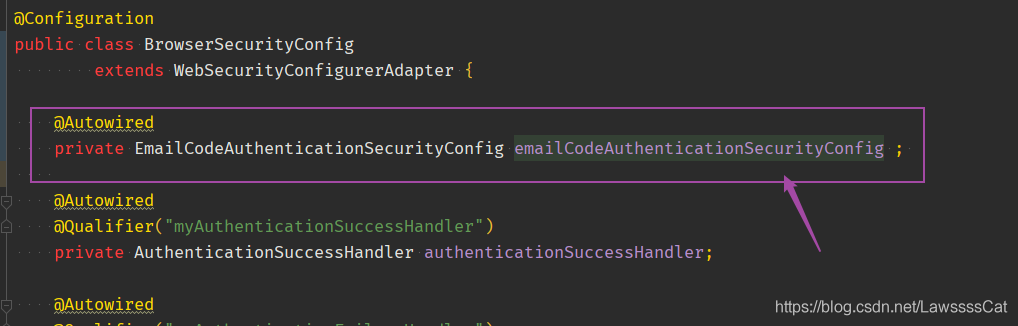
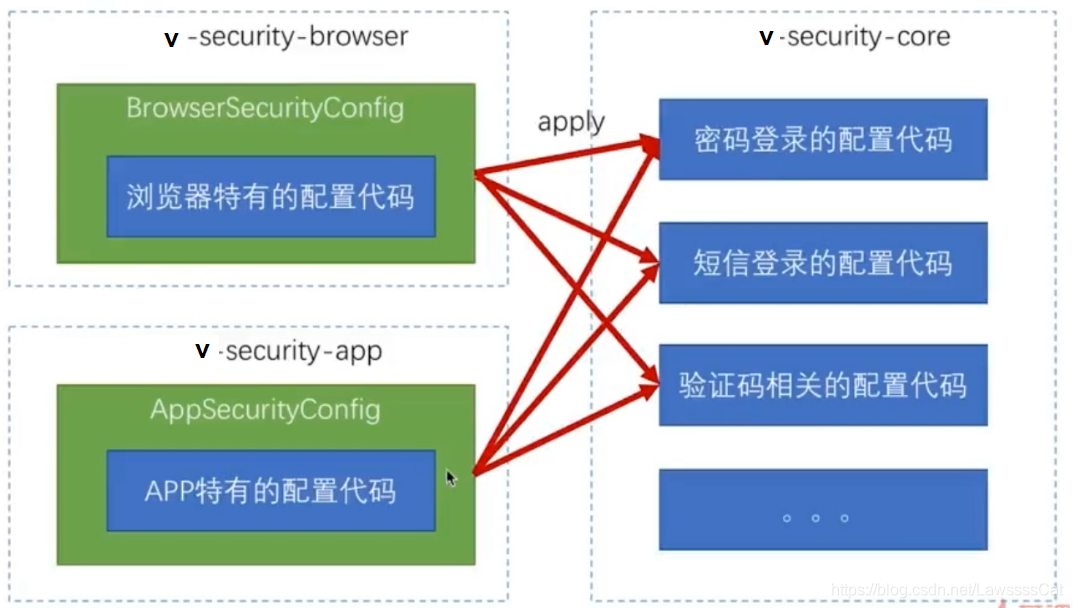
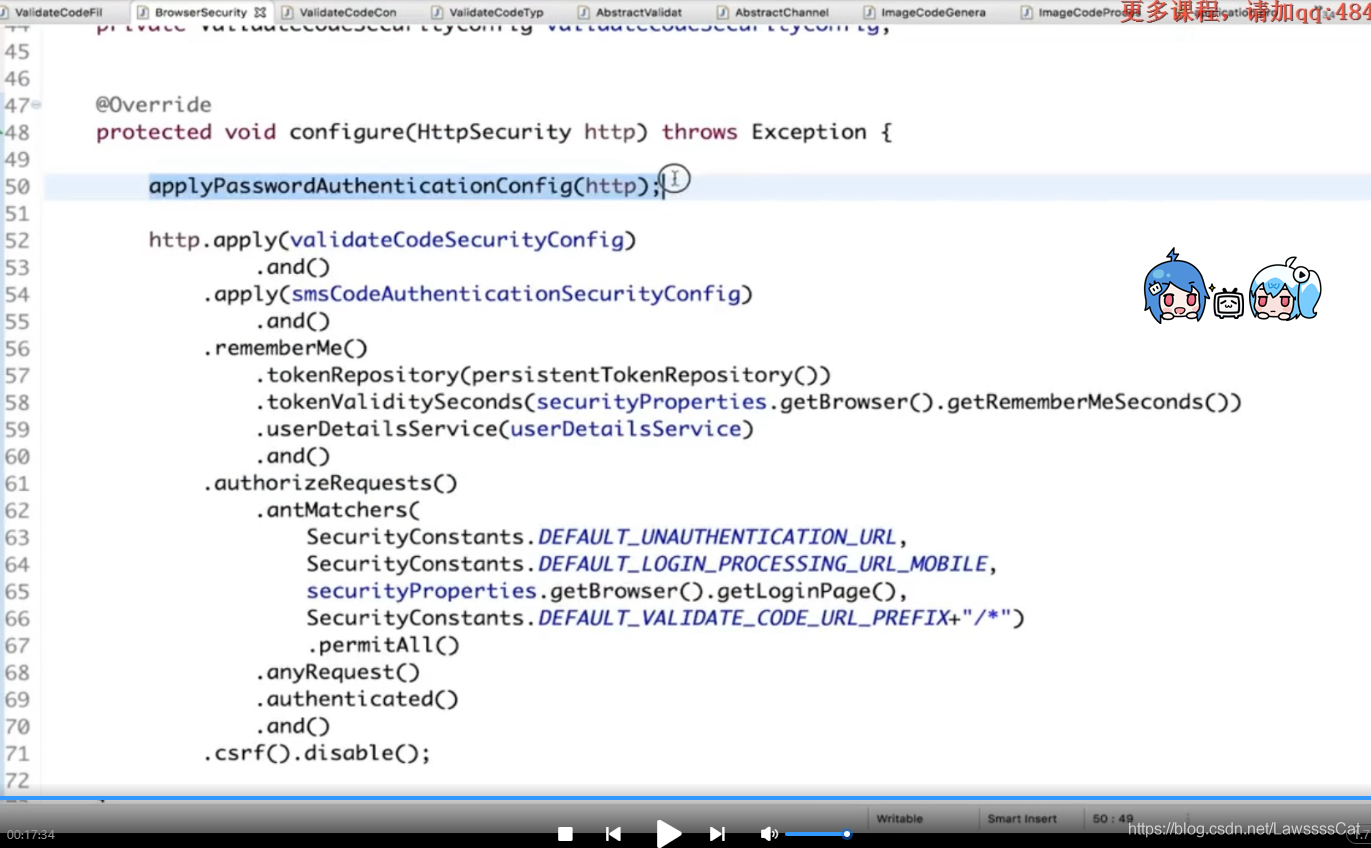
修改BrowserSecurityConfig 在应用配置中导入新加的配置。下图是旧版截图,只参考apply的位置,不要复制图中的csrf().disable();邮箱登录依赖Session,必须保留CSRF保护并使用上文的令牌提交方式。
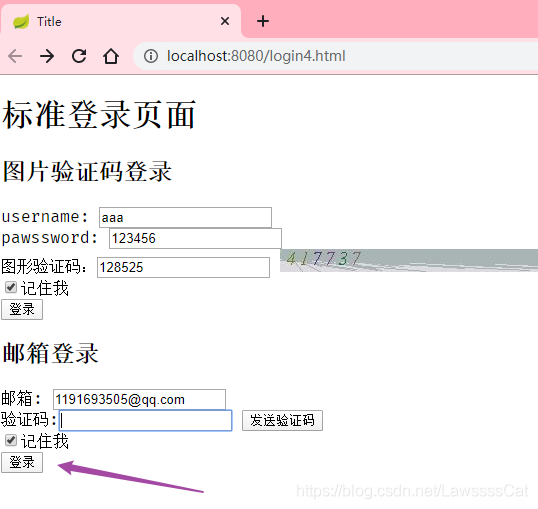
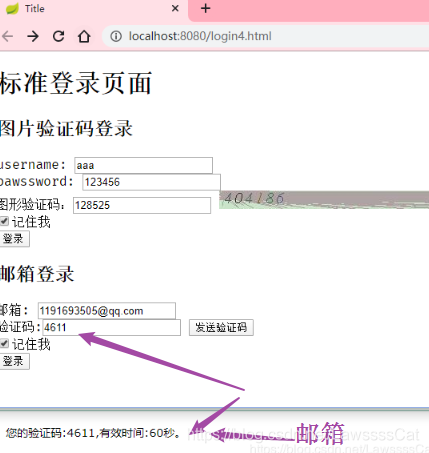
登录测试 把两种登录方式放入了同一页面login4.html
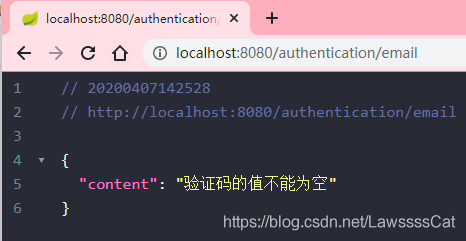
不输入验证码,直接邮箱登录
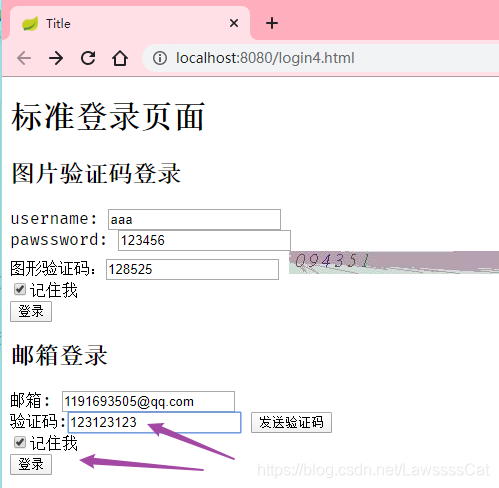
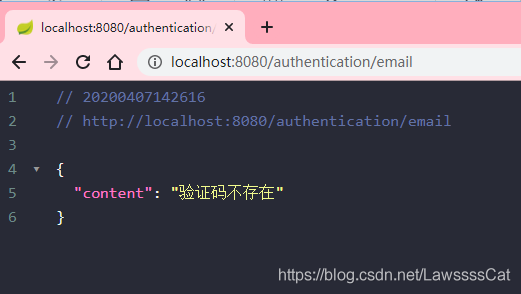
随便乱输入
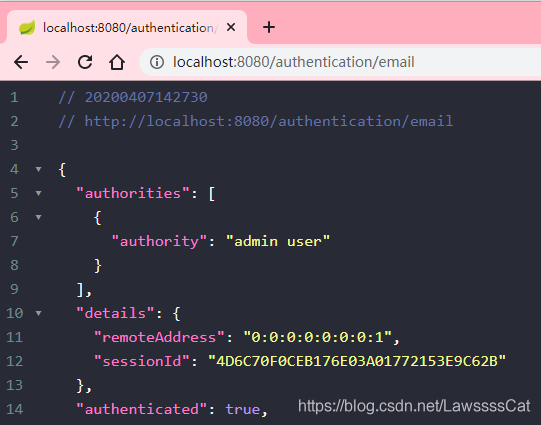
输入正确验证码
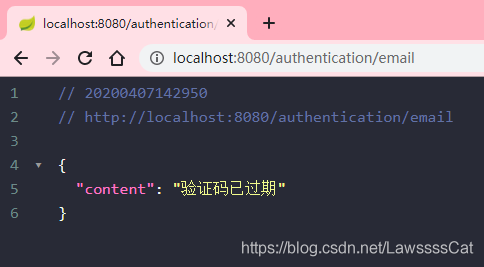
等待60s(验证码过期)
同时,图片验证码也是可用的
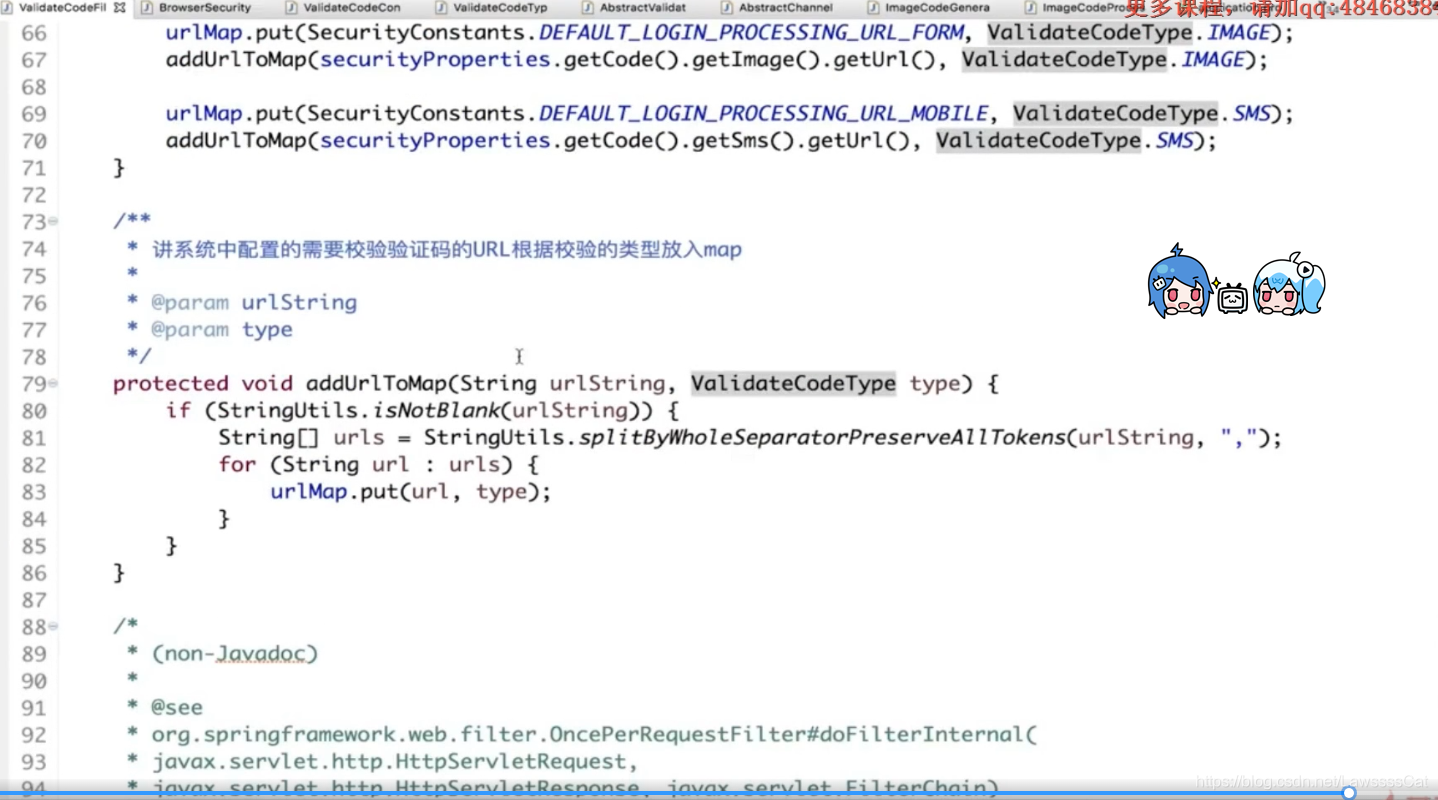
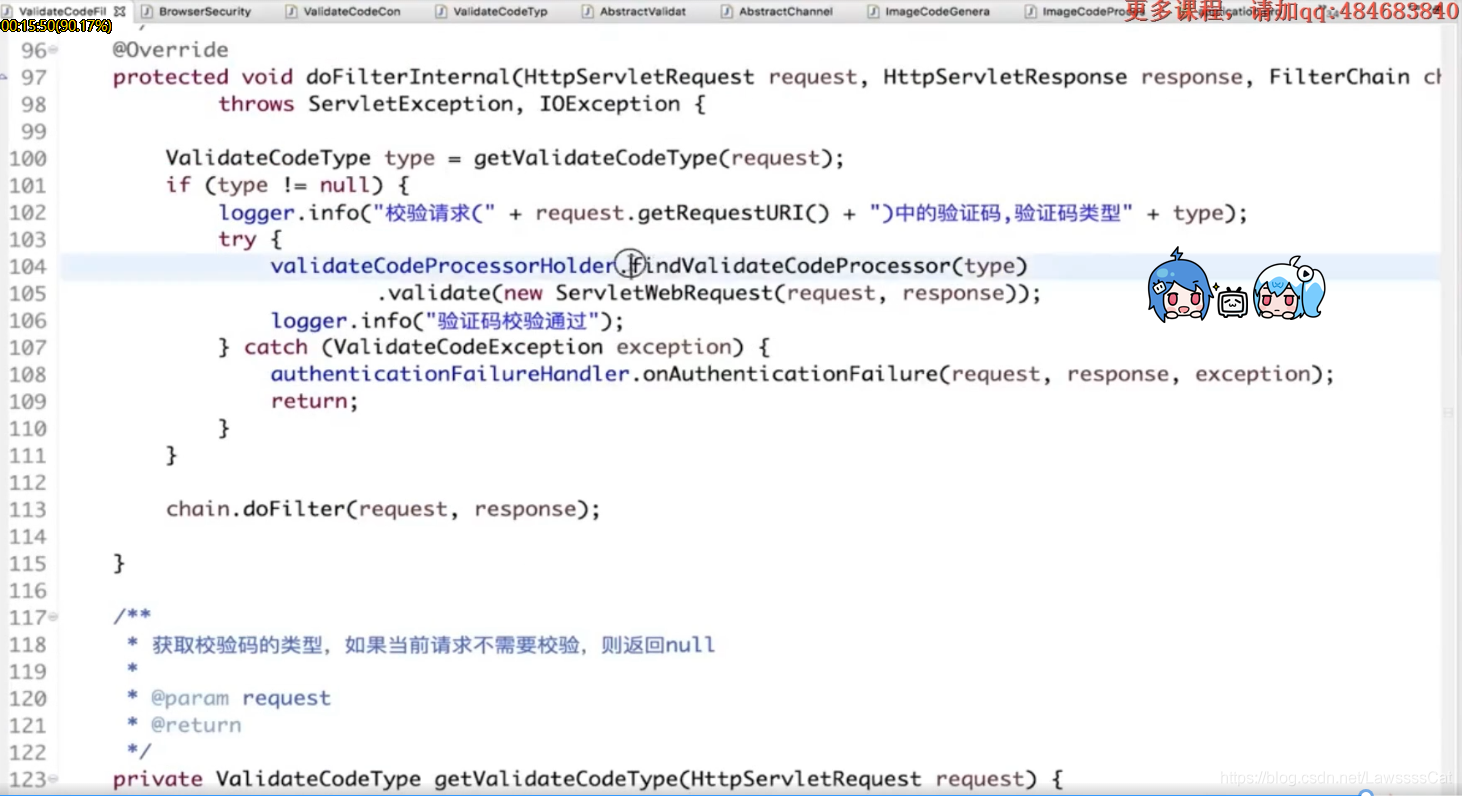
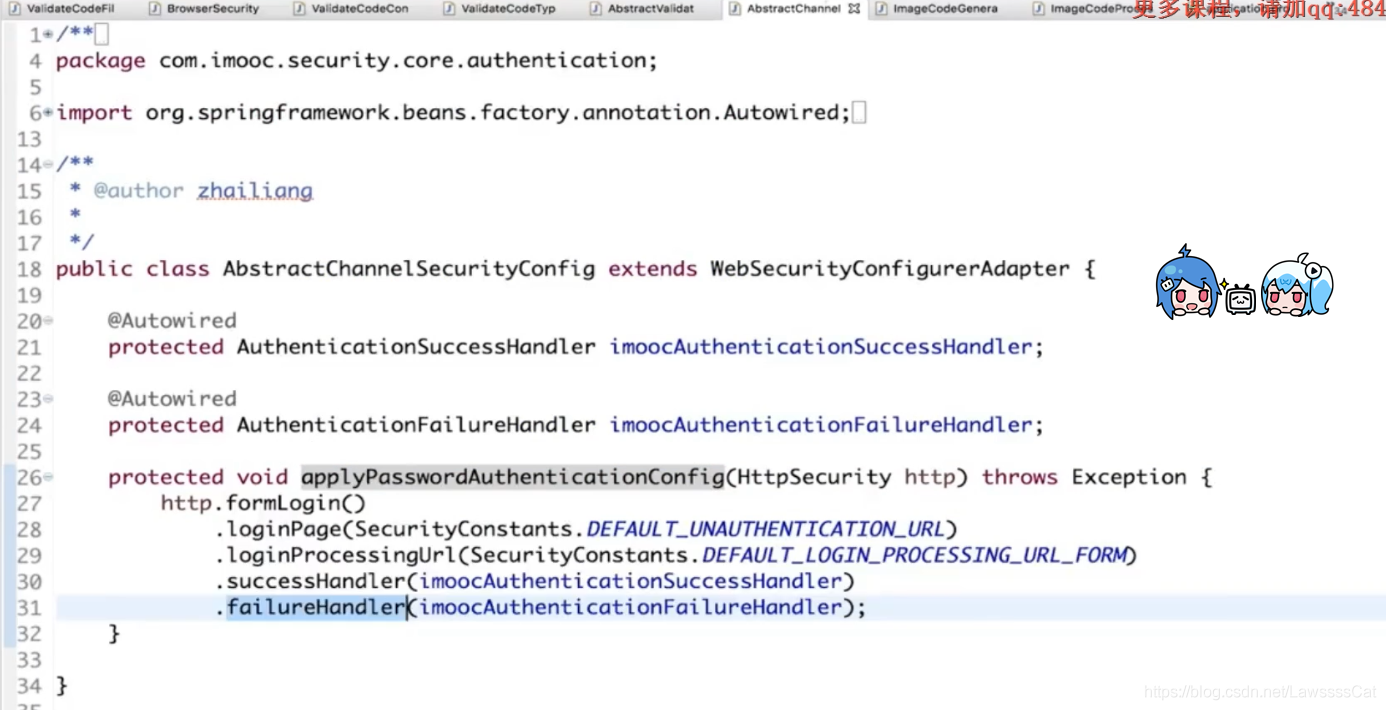
重构代码(二) 图形验证码和邮箱验证码重复的配置部分 将重复部分抽出为一个个的类,用apply方法应用其配置,使其生效
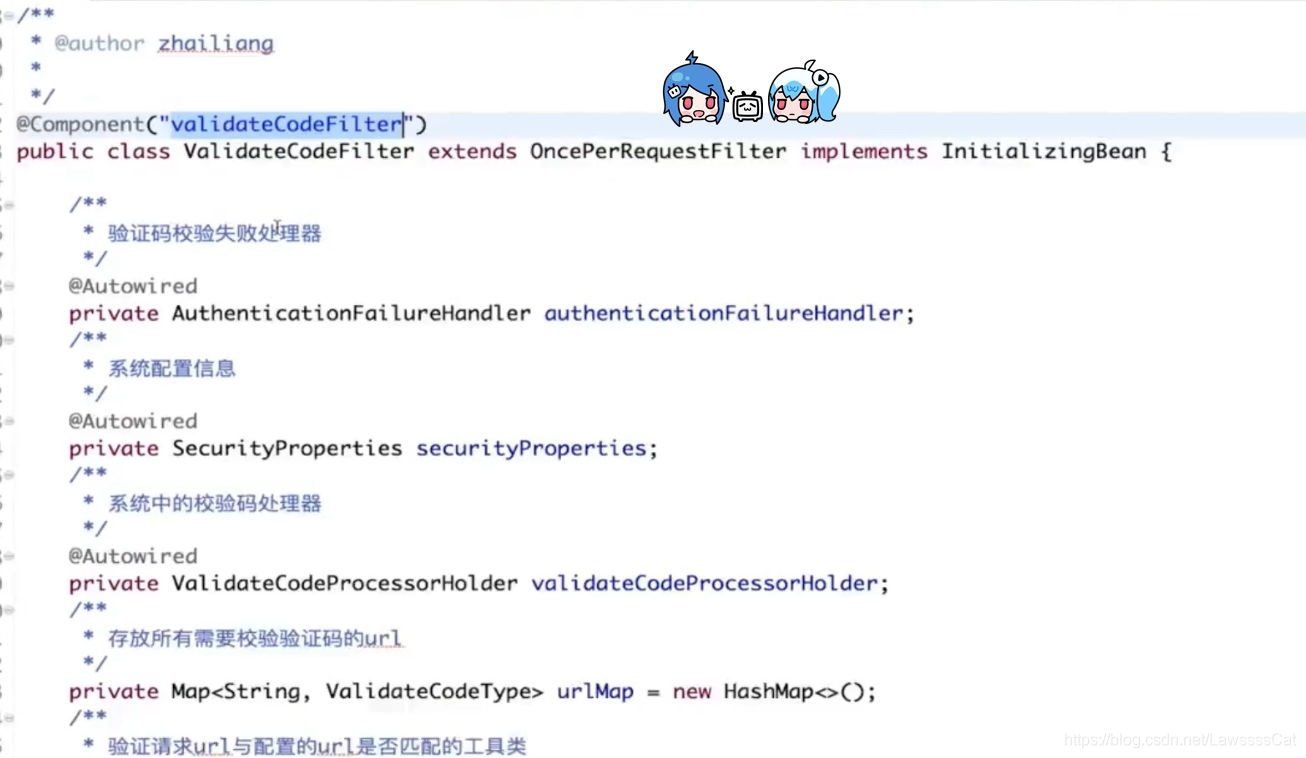
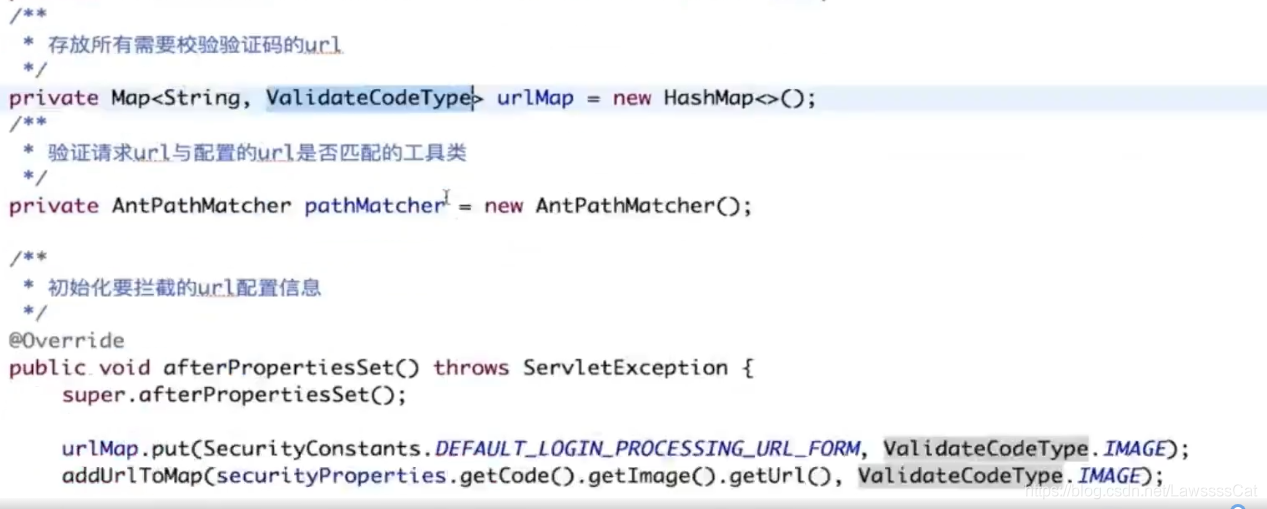
图形和邮箱校验码的校验过滤器(validateFilter)合并为一个。以下截图保留旧重构过程;合并时要同步加入上文的邮箱绑定、单次消费、失败处理和限流,不能直接照搬截图中的旧校验逻辑。